Message your clients directly from Upheal 💬
Most EHR messaging is just a secure chat box. Upheal Messaging connects to your clinical record. So when a client messages you between sessions, your Assistant can draft a message using your actual session notes, treatment plans, and assessments.
What’s available now:
Send and receive secure messages: Start a conversation from the Messaging tab in Upheal. Your clients see it in their Client Portal on iOS (Android coming very soon), and you can see when they’ve opened it.
AI-drafted messages: Ask Upheal Assistant to draft any message, whether you're starting a new conversation or responding to a client. It draws from your clinical documentation, and you review, edit, and send. It never sends without your approval.
Send announcements: Broadcast a message to selected clients or all your clients at once. Useful for practice updates, holiday schedules, rate changes, or anything you'd otherwise send one by one.
Stay organized: Mark conversations as unread, see at a glance who you haven't responded to, and keep all client communication in one place.
Watch a quick demo video of Client Messaging →
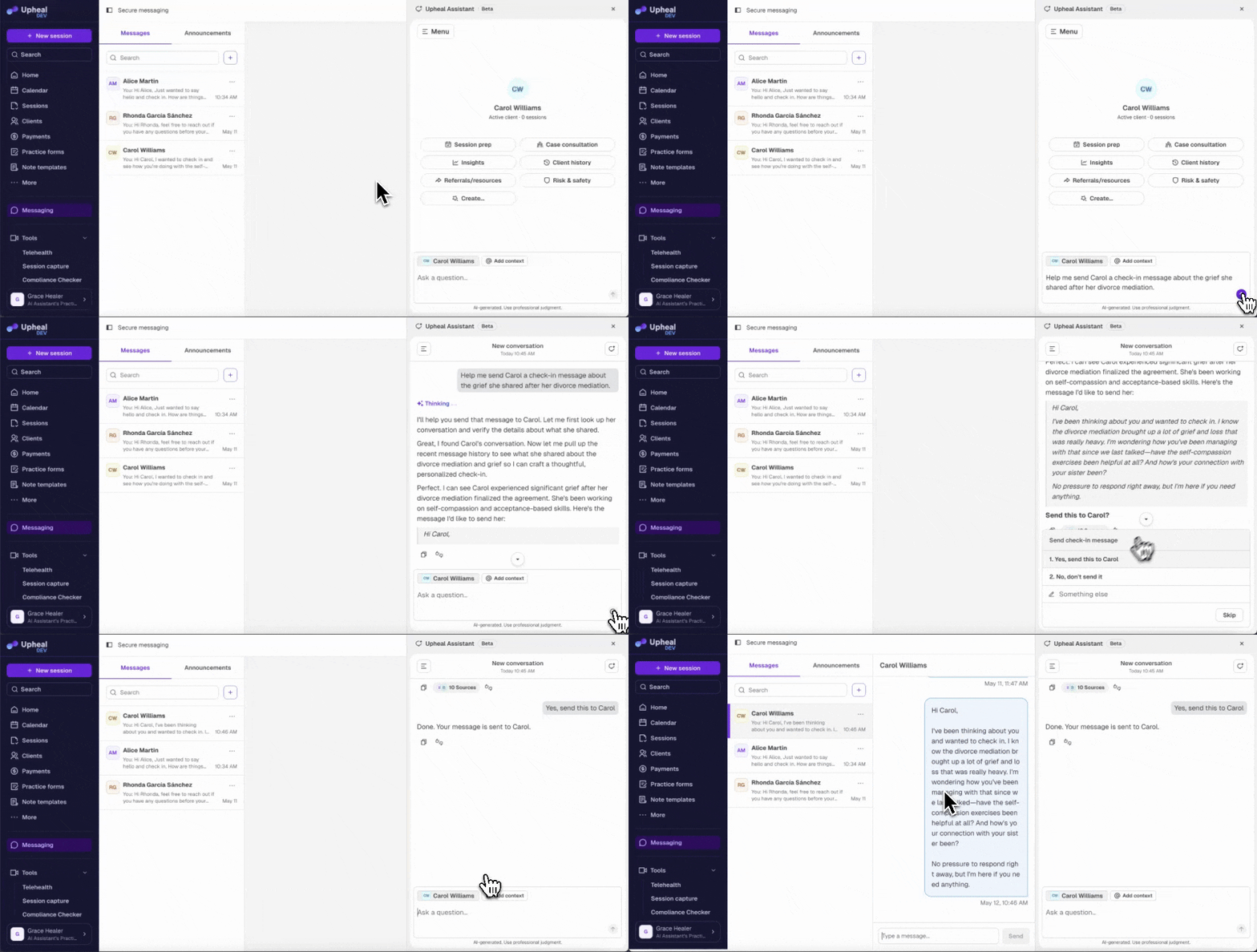
Messaging is off by default. Turn it on in Settings → Messaging.
What's coming next
Attachments in Messaging: Send documents, worksheets, and resources directly in the conversation thread.
Client billing in the portal: Clients will be able to view invoices and pay directly from their portal.
Have a feature request or want to see what else is coming? Check out our roadmap →