Let Upheal Assistant handle your routine work 🔁
Routines are tasks that Upheal Assistant runs in the background on a schedule. It does the checking and drafting, you review what it finds, and nothing goes out without your approval.
Built-in routines from Upheal
Daily billing wrap-up (beta): each day, the Assistant checks what self-pay clients owe, what's overdue, which charges failed and which sessions haven't been invoiced. It skips cancelled and missed sessions and posts a summary to your Home screen. When you're ready, tap "Yes, do that" to apply a credit, charge a card or send an invoice.
Session Prep: a briefing before each session so you walk in ready.
You can turn either one off, or run it on demand, from your Assistant settings.
Create your own routines
Write any instruction in plain language and choose when it runs. A few ideas:
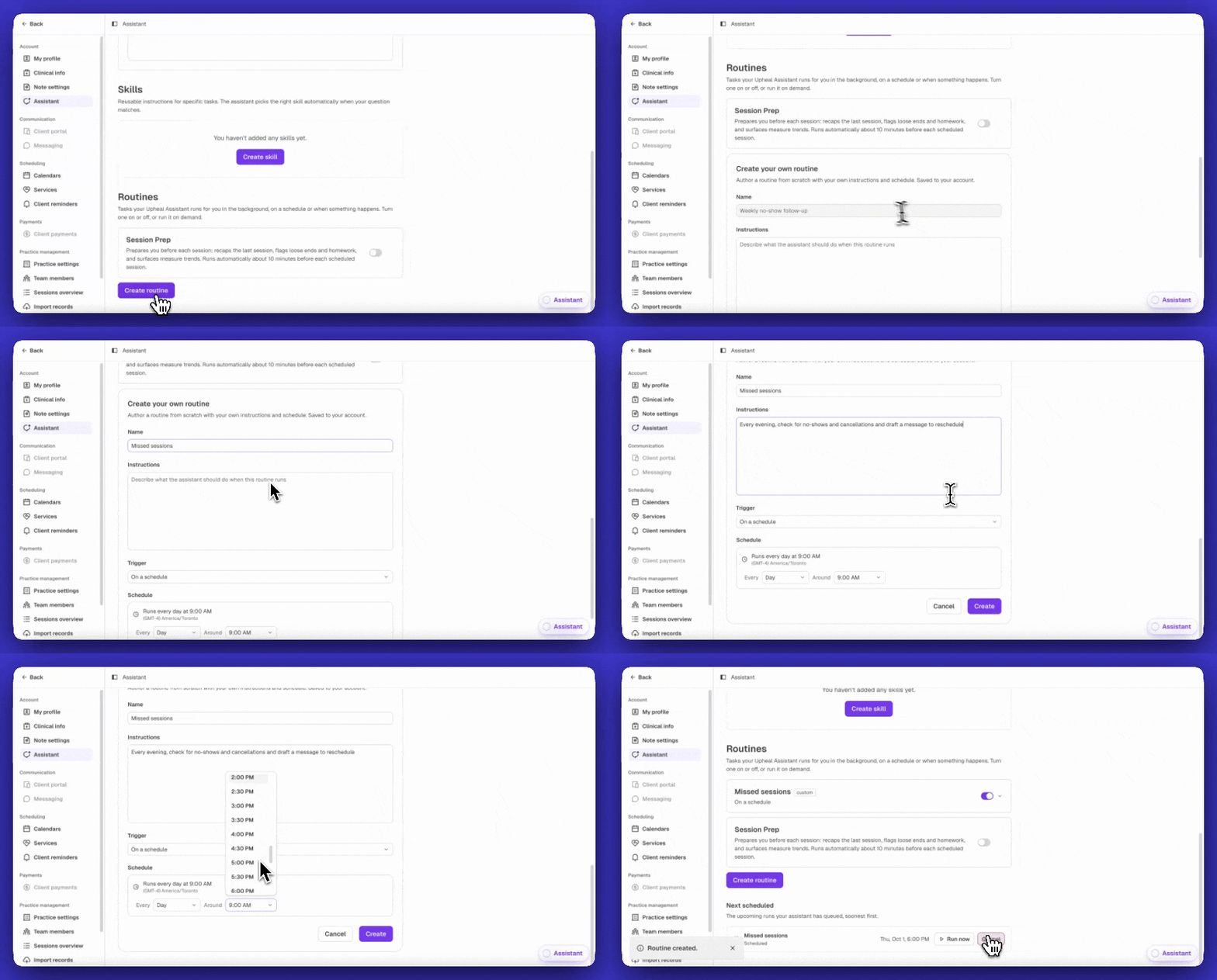
Missed sessions: "Every evening, check for no-shows and cancellations and draft a message to reschedule."
Treatment plan check-ins: "Every month, remind me which clients need treatment plan updates based on their progress."
Denied claims: "Every Monday, list any denied claims and the reason for each. Draft appeal letters where possible."
Session follow-ups: "Every Friday, go through this week's sessions and list anything I said I'd follow up on for my clients."
Insurance eligibility: "Every January, re-check eligibility for every insured client in my practice."
To set one up, ask the Assistant to create it for you, or go to Routines in your Assistant settings.
How routines use your Assistant allowance
Routines run in the background, so each run counts toward your monthly Assistant allowance. It works the same way as asking the Assistant to look up or analyze your practice data. How much a run uses depends on how much work it takes, so a quick check uses less than a longer review. The allowance resets every month, and you'll get a heads-up before you run out. With Assistant Pro, there's no limit.
If you'd rather save your allowance for chat, you can turn routines off by going to Settings → Assistant, then scrolling down to Routines.
See everything your Assistant can do
Routines are one way to use the Assistant. To see what else it can do, browse our library of 50+ jobs you can hand to your Assistant:
Sessions: Quick prep, Since last time, Check-in message, No-show follow-up
Notes & paperwork: Bullets to progress note, Discharge summary, Referral letter, Shorter note
Treatment plans: Plan review, Update treatment goals
Billing: Denial appeal, Superbill, Pre-billing check, Outstanding balances
Practice admin: Start my day, Unsigned notes, Missing forms, Sick day
Grow as a clinician: Supervision prep, Blind spots, Therapeutic alliance, Better questions
Each job takes one sentence. You ask, the Assistant drafts, and you review.
We'll be adding more built-in routines soon. Have an idea for one? Share it with us or explore the roadmap.