Import your full client list from any EHR in minutes

If rebuilding your client list from scratch has been holding you back from switching to Upheal, that's no longer the case. You can now move your entire client list into Upheal at once, no rebuilding required.
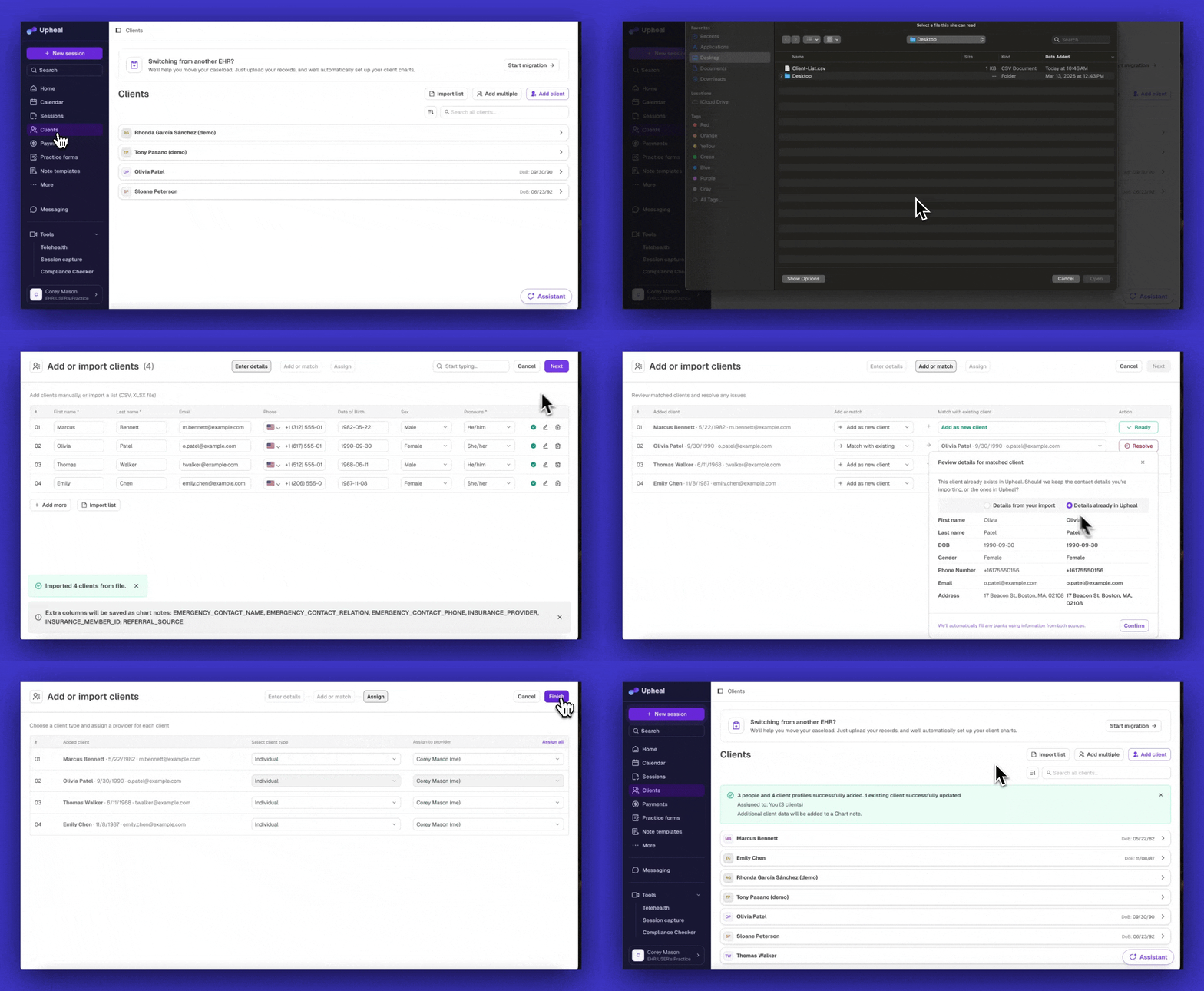
The tool walks you through three steps:
Upload or enter your list: Drop in a CSV or XLSX export from your current EHR, or type clients in manually. The tool recognizes column names from most major EHR formats and handles up to 500 clients at once.
Resolve any matches: If some clients already exist in Upheal, the tool flags them so you can decide what to do: add as new, keep what's already there, or update with your import data. Nothing gets overwritten without your confirmation.
Set contract types and assign providers: Mark couples and family contracts, and assign each client to the right therapist in your practice. You can assign everyone at once or go row by row.
Any data your previous EHR included that doesn't map to a field in Upheal (emergency contacts, extra demographics, insurance details) is automatically saved as a Chart Note on each client's record, so nothing gets lost in the move.
You'll find the import tool on your Clients page. It's available to practice admins.
What's coming next?
File and document transfers: The next step in migration support is bringing clinical notes and documents from your previous EHR into each client's chart in Upheal.
Coming from SimplePractice?
If you're coming from SimplePractice, don't forget you can also use our AI migration feature to easily bring over your clients, notes, and data.